The manual#
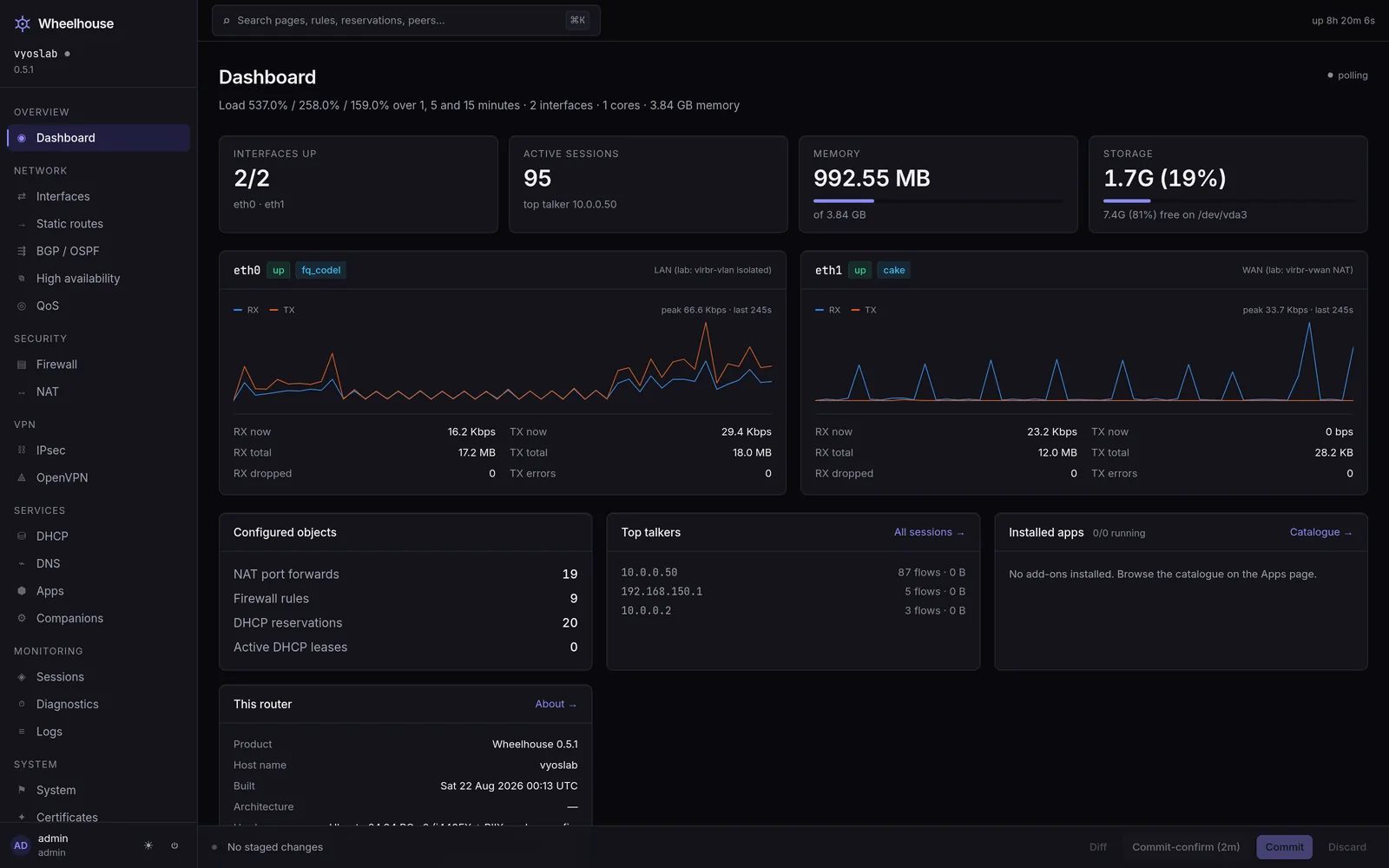
One page per screen in the web UI, and for the larger screens one page per tab. Each page says what the screen reads, what each field accepts, what each editor changes, and what the screen does not do. The pages are in three sections that follow the left navigation.
The three sections#
| Section | What is in it |
|---|---|
| Network | Everything that decides where a packet goes and what address a host has: interfaces and their live kernel state, static routes beside the forwarding table, BGP and OSPF, multi-WAN and VRRP, DHCP and DNS. |
| Security, VPN and accounts | What reaches the router and who may change it: the firewall, NAT, the IDS, WireGuard, IPsec, OpenVPN, users, roles, your own account, single sign-on and API tokens. |
| Services, monitoring and system | Everything that watches the router or changes the box rather than a protocol: the Overview, telemetry, shaping, the app catalogue, diagnostics, the journal, system settings, certificates, system images, backup, the audit log, the support bundle and the licence. |
The screens, in navigation order#
Thirty-five entries in seven groups, with Pinned above them.
| Nav group | Screen | Page |
|---|---|---|
| Bridge | Overview | Overview |
| Network | Interfaces | Interfaces |
| Network | Networks | Networks |
| Network | Static routes | Static routes |
| Network | IPv6 | IPv6 |
| Network | BGP / OSPF | BGP / OSPF |
| Network | VRF | VRF |
| Network | High availability | High availability |
| Network | QoS | QoS |
| Protect | Firewall | Firewall |
| Protect | NAT | NAT |
| Protect | IDS | IDS |
| Protect | WireGuard | WireGuard |
| Protect | IPsec | IPsec |
| Protect | OpenVPN | OpenVPN |
| Services | DHCP | DHCP |
| Services | DNS | DNS |
| Services | UPnP | UPnP |
| Services | Apps | Apps |
| Services | Companions | Companions |
| Observe | Sessions | Sessions |
| Observe | Diagnostics | Diagnostics |
| Observe | Logs | Logs |
| System | System | System |
| System | Certificates | Certificates |
| System | Configuration tree (Advanced mode) | The configuration tree |
| System | Reconcile (Advanced mode) | Desired state |
| System | Fleet | Fleet |
| System | Backup | Backup and restore |
| System | Support | Support |
| System | About | About Wheelhouse |
| Admin | Users | Users, and Single sign-on for the section of that page |
| Admin | API tokens | API tokens |
| Admin | Agent settings | Agent settings |
| Admin | Licence | Licence |
Pinned comes first: the pages you pinned, in your order, or Firewall, Sessions and Logs until you pin your own. A pinned page that one number describes shows it beside its name — Firewall its rules, NAT its port forwards, Sessions its connections, DHCP its leases, WireGuard its peers, Apps its installed apps. Pin and Unpin appear beside a page when you point at it or reach it with the keyboard, and always on a touch screen; up to twelve pages can be pinned. Bridge is always open; the other groups fold, except the one holding the page on screen.
An installed app whose catalogue entry names a navigation entry is listed under Services, after Companions.
Account is not in that list: it opens from the account menu at the top right, which also holds the theme switch and Sign out, and from your own name at the foot of the navigation — Account.
The search field at the top, "Search pages, rules, reservations, peers" (⌘K or Ctrl-K), finds a page by its name, and finds firewall and NAT rules, DHCP reservations, WireGuard peers, networks, static routes, interfaces and installed apps; choosing one opens it on the page where it is edited.
Some entries do not always appear. IDS, WireGuard and UPnP are hidden until
their feature module is installed. Fleet is hidden unless the licence carries the
fleet feature. Configuration tree and Reconcile are listed only with Advanced
mode on (Account → Preferences). Backup and the Admin group are shown to admins only.
Four things that hold on every page in this section#
Nothing on a configuration screen applies itself. Every editor adds its change to the pending changes, and the Commit Bar, which appears at the bottom of the page while anything is pending, is the only thing in the product that applies them. The accounts and administration pages are the exception and say so: Users, API tokens, Account and Agent settings change the agent's own state file and take effect the moment you save.
Reading never needs a licence; changing anything does. A write needs the operator
role and a usable licence. An unlicensed agent answers 402 on those routes and keeps
serving every read about this router, the audit log and the login screen —
What the licence gates.
Live state and configured intent are different things, and the pages never blur them. A panel that shows what the kernel is doing is labelled as such; a panel that shows what the configuration says is labelled as such. Where they disagree, that disagreement is the information — State against intent.
A disabled control mirrors your role; it does not enforce it. Roles are enforced by the agent on every route, and an attempt to use one your role does not reach is recorded in the audit log with your name on it — Roles.
Where to go instead#
- To do a specific job rather than to understand a screen — Task guides. A guide names the screens it uses and links back here.
- For the exact value of a field — Reference, which has every default, bound and endpoint in tables.
- For the model behind the screens — How Wheelhouse works.
See also#
- The Commit Bar — the bar at the foot of the screen while anything is pending.
- Pending changes — why a change waits.
- First hour on a new router — the screens worth visiting in order, on a newly installed box.