NAT#
Protect → NAT shows the router's address translation as three tables — port forwards, 1:1 NAT and source NAT — each row carrying the packet and byte counts the router reports for it. Each table has its own add button, and clicking a row opens it in a side panel. Every change is added to the pending changes and reaches the router when they are applied.
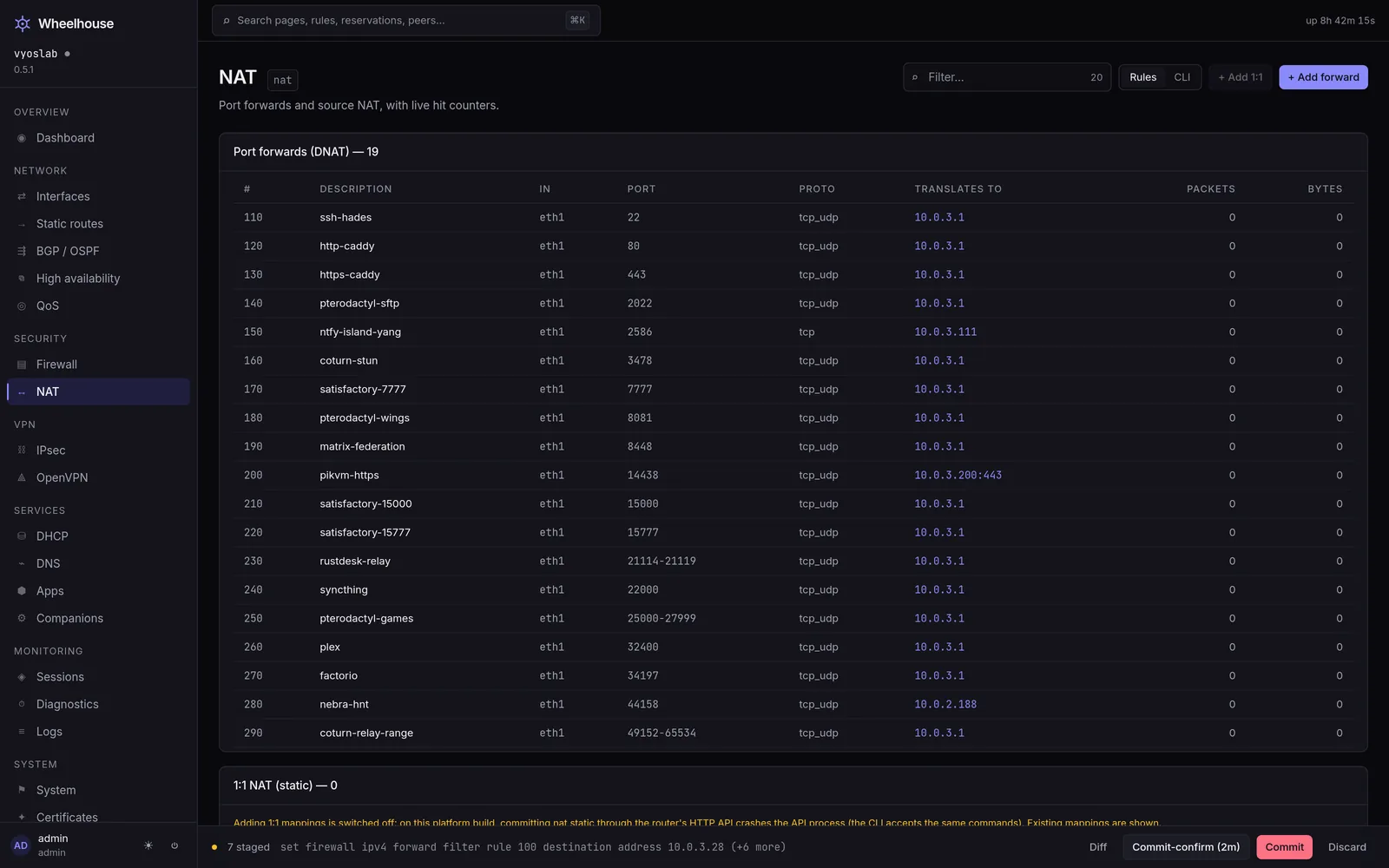
The three tables#
Port forwards#
Connections arriving at the router, sent on to a device behind it.
| Column | What it shows |
|---|---|
| # | The rule number. |
| Description | Its description, and Disabled when it is. |
| Protocol | TCP and UDP, TCP, UDP — or Any. |
| Port | The external port or ports, or Any. |
| Forwards to | The device's address, with :port when the forward changes the port. |
| Interface | Where the connections arrive, or Any. |
| Packets / Bytes | The router's counters for the rule. |
See port forwards. A port forward alone does not admit the connections: the Forward chain of the firewall still decides, which is why a new forward offers the rule that admits it.
1:1 NAT#
A public address mapped to a device behind the router, every port, both ways.
| Column | What it shows |
|---|---|
| Description | Its description, Disabled when it is, and Read-only for a mapping made outside Wheelhouse. |
| Public address | The address — or network — the mapping answers for. |
| Inside address | The device — or network of the same size — it maps to. |
| Interface | Where the public address arrives. |
| Packets in / Packets out | The counters of the two rules a mapping is made of. |
See 1:1 NAT.
Source NAT#
Traffic leaving the router, sent from an address of the router's instead of its own.
| Column | What it shows |
|---|---|
| # | The rule number. |
| Description | Its description, and Disabled when it is. |
| Source | The addresses the rule applies to, or Any. |
| Interface | Where the traffic leaves, or Any. |
| Leaves as | Interface address — the address the interface has at the time — or a fixed address. |
| Packets / Bytes | The router's counters for the rule. |
See source NAT.
Counters#
The counters are read every five seconds. When they cannot be read the page says so above the tables and the columns show a dash: a dash means the read failed, zero means nothing matched.
Rule numbers#
NAT rules are checked in number order, lowest first, and the first match decides. That is why the editors care where a new rule goes:
- a new port forward takes the next number up, counting rules that are pending as well as those on the router;
- a new source NAT rule is numbered before the rule that would otherwise take its traffic — usually the masquerade the installer writes — and a number behind one is refused under the field;
- a 1:1 mapping is numbered ahead of the port forwards and masquerade on its interface, by the router's own planner.
The CLI view#
In Advanced mode a CLI switch in the header replaces the tables with the router's NAT configuration as commands, and each editor shows the commands it will add. Without Advanced mode neither is shown.
What you need to change anything#
Adding, editing and deleting need the operator role; a viewer sees the tables with the add buttons disabled. Applying needs a licence as well. Every change to NAT can affect how traffic reaches you, so apply with auto-revert when you are working remotely.
See also#
- Port forwards — the forward, the rule that admits it, and reaching it from inside on the public address.
- 1:1 NAT — a public address for one device.
- Source NAT — how the network reaches the internet.
- Firewall — rules — the other half of every published service.
- Worked rulesets — publishing a service, end to end.
- Publish a service — the guide.
- The HTTP API — the routes this page calls.