Wheelhouse docs

Interfaces#

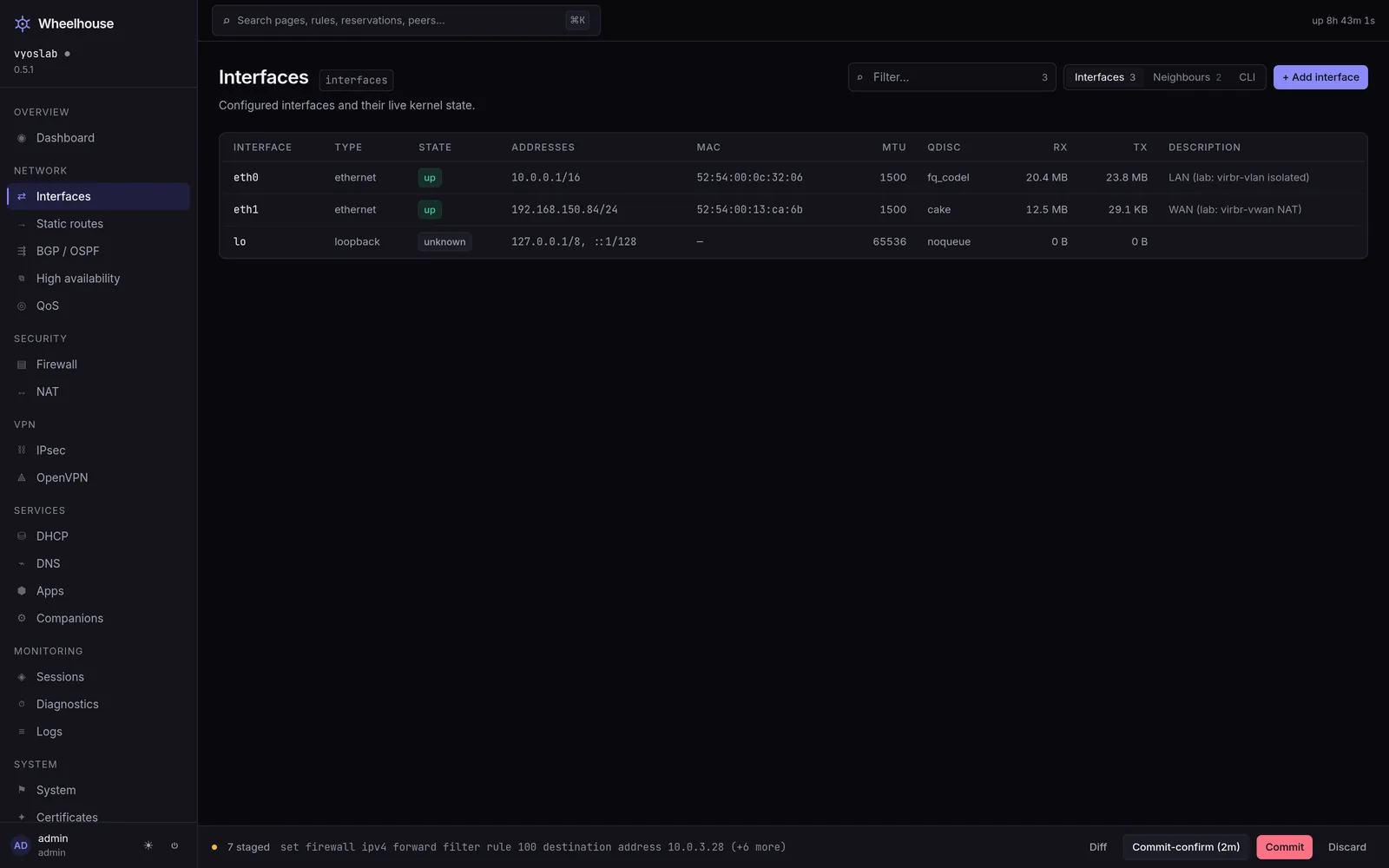
Network → Interfaces, at /interfaces. The page owns the interfaces subtree and says so beside its title. Each row is one interface as the configuration declares it, joined with what the kernel says about it right now: link state, addresses, MAC, MTU, qdisc and byte counters. Three views share the page — the table, a neighbour table, and the whole subtree rendered as set commands. Editing happens in a side panel; nothing is applied until the Commit Bar commits.

Where the data comes from#

CallPolledWhat it returns
GET /api/interfaceson load and after each commit{"config": …, "status": …} — the interfaces configuration subtree, and the text of show interfaces
GET /api/interfaces/detailevery 4 sone parsed block per configured interface: flags, MTU, qdisc, state, MAC, addresses, RX and TX counters
GET /api/config/commands?path=interfaceson load and after each committhe subtree as set commands, for the CLI view
GET /api/neighborsevery 15 sshow arp, parsed into rows

GET /api/interfaces/detail runs one show interfaces <kind> <name> per configured interface, and every call into the VyOS HTTP API forks cli-shell-api on the router — so on a box with a dozen interfaces this is the most expensive read in the product. The agent caches each interface's block for 20 seconds (interfaceDetailTTL), which is longer than the page's four-second poll, so leaving this page open costs the router one round of reads every 20 seconds rather than one every four — agent/cache.go, agent/opmode.go (collectInterfaces), docs/deploy.md ("What the agent costs the router").

If the router cannot be reached, GET /api/interfaces answers 502 naming the cause and the page renders the error with a retry button rather than an empty table.

The table#

One row per interface, sorted by name.

ColumnWhere the value comes fromNotes
Interfacethe name under its kind in the config treemonospace; carries the drift badge when the row is not declared
Typethe config node the interface lives under: ethernet, bridge, bonding, tunnel, vxlan, dummy, wireguard, pppoe, loopbackthis is the word the commands use, not a friendly label
Statestate from the kernel blockup green, unknown grey, anything else red
Addressesthe kernel's addresses when it reported any, otherwise the configured oneslink-local fe80… addresses are filtered out of this column
MAClink/ether from the kernel block, falling back to the configured hw-ida tunnel prints its local address in that slot and so has no MAC
MTUmtu from the kernel block when the interface has not been read
Qdiscqdisc from the kernel blockthis is where a shaper shows up; see QoS
RX / TXcumulative bytes from the kernel's counter blocktotals since the interface came up, not a rate
Descriptionthe configured description

The counters are totals. For a rate, the Dashboard samples them every five seconds and keeps twenty minutes of history — see Telemetry.

Filtering and sorting#

The Filter box above the table matches across the rendered row and shows a count; it filters in the browser, so it never costs the router a read. Every column with a sort is clickable. Both are the shared DataTable, so they behave the same on every table in the product — ui/src/components/ui.tsx.

The drift badge#

Rows are built in two passes. The first walks the configuration tree — every interfaces <kind> <name> becomes a row, merged with its kernel block if one arrived. The second walks what GET /api/interfaces/detail reported and appends anything the first pass did not already produce, with the type unmanaged and a drift badge reading present on the router but not in the config tree.

What the table does not show#

VLAN sub-interfaces do not get a row of their own. The table's first pass walks the top-level names under each kind, and GET /api/interfaces/detail reads one show interfaces <kind> <name> per one of those names. A VLAN lives under its parent as interfaces ethernet eth0 vif 10, so it is part of eth0's node, not a name of its own. It appears in the CLI view, in the config tree and in show interfaces on the router; it does not appear as a row here, and it is not offered in the interface pickers on the DHCP relay, IPv6 and mDNS tabs, which are built from the same list — ui/src/pages/Interfaces.tsx, agent/opmode.go (collectInterfaces), ui/src/pages/DhcpExtras.tsx (useInterfaces).

The Uplinks tab uses a different reader that does flatten vif children, so a VLAN uplink is visible there — agent/wan.go (listConfiguredInterfaces).

The three views#

The Segmented control in the header switches between them.

Interfaces is the table above.

Neighbours is the ARP table, documented on Neighbours.

CLI renders show configuration commands | match interfaces for the whole subtree, in a block with a copy button. It is the fastest way to get the current interface configuration into a text file or a CLI session, and it is exactly what the router would print. Below admin, values whose leaf name is a secret are replaced before the response leaves the agent — GET /api/config/commands is wrapped in redactSecrets(RoleAdmin, …)agent/main.go, agent/security.go.

The empty state#

A router with no interfaces node at all shows the concepts and the commands rather than the words "no data":

set interfaces ethernet eth0 address 10.0.0.1/16
set interfaces ethernet eth0 description LAN

Worked example: give a spare port an address#

eth2 is cabled to a new switch and has no configuration.

  1. Open Network → Interfaces and click the eth2 row.
  2. In Add address, type 10.0.20.1/24.
  3. In Set description, type LAB.
  4. The Commands block at the foot of the panel now reads:

    set interfaces ethernet eth2 address 10.0.20.1/24
    set interfaces ethernet eth2 description LAB
  5. Click Stage 2 changes. The Commit Bar shows 2.
  6. The staged set contains address, so the Commit Bar treats it as dangerous and offers Commit-confirm. Use it: if the change is wrong you get the previous configuration back after a reboot rather than a router you cannot reach.
  7. Confirm within the window.

Then check the row: State should read up once the switch port comes up, and the Addresses column should show 10.0.20.1/24 from the kernel rather than from the configuration.

What breaks if you get it wrong#

  • An address with no prefix length. 10.0.20.1 is rejected at commit; VyOS wants 10.0.20.1/24. The field's hint says CIDR for exactly this reason.
  • Two interfaces in the same subnet. The commit succeeds and the routing gets interesting. Nothing in this page checks for it.
  • Changing the address of the interface you are connected through. The commit applies, your TCP session dies, and if you did not arm commit-confirm the router keeps the new configuration. Arm it.
  • disable on the management interface. Same outcome, faster. The checkbox in the side panel says what it does; see The interface panel.
  • An MTU larger than the path supports. Nothing on the router complains. Traffic simply stops for anything that fills a packet. See Addressing.

See also#

  • The interface panel — every control in the side panel, and what each one stages.
  • Adding an interface — VLAN, bridge, bond, tunnel, VXLAN and dummy.
  • Addressing — valid values for the address and MTU fields.
  • Static routes — what the kernel does with the addresses on these interfaces.
  • Uplinks (multi-WAN) — the interfaces that carry a default route have a second, deeper view of their own.
  • QoS — the Qdisc column, and the policy behind it.

Checked against ui/src/pages/Interfaces.tsx, agent/main.go (handleInterfaces), agent/opmode.go (handleInterfacesDetail, collectInterfaces), agent/parse.go (parseInterfaceDetail), agent/cache.go, ui/src/lib/api.ts.

Updated 2026-09-02 manual network interfaces drift