Firewall#
Protect → Firewall is where the router's filtering is read and changed: every rule of both address families with the packet and byte counts the router has recorded against it, the chains and rule sets those rules live in, the groups they match on, and the settings that apply to all of them. Everything on the page is edited in a side panel and added to the pending changes; nothing reaches the router until the changes are applied from the bar at the bottom of the page.
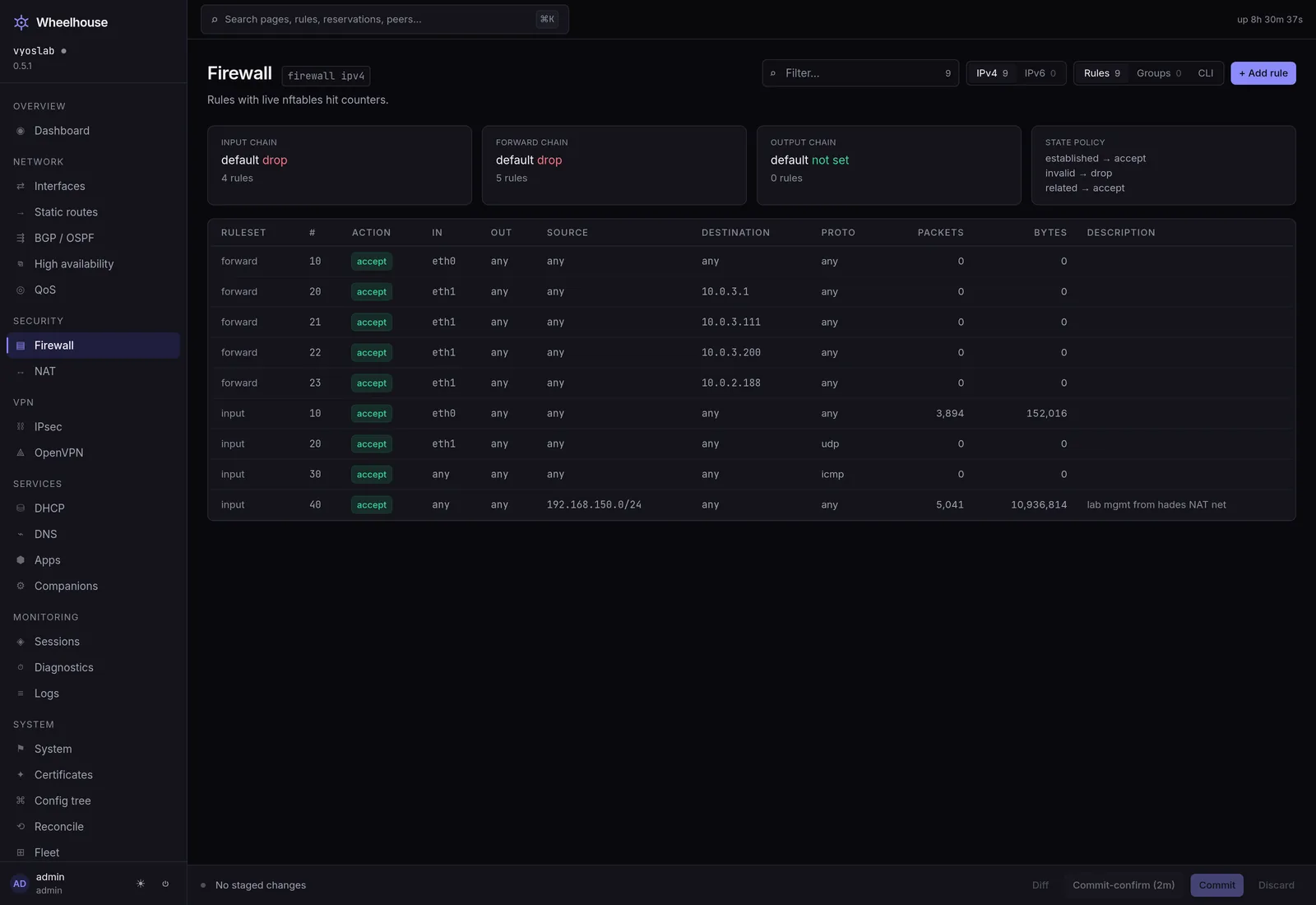
A rule with no packets counted against it is either not matching or not being reached.
The tabs#
| Tab | What it holds |
|---|---|
| Rules | Every rule of the chosen address family, in every chain and rule set. Rules. |
| Rule sets | The three chains and every named rule set, with their default actions and what uses them. Rule sets below. |
| Groups | Named sets of addresses, networks, ports, domains, MAC addresses or interfaces that rules match on. Groups. |
| Settings | The connection state policy, the global options and the country data. Settings below. |
In Advanced mode (a setting on your account) two more tabs appear: nftables, the router's own rendering of what it compiled one rule set into, and CLI, the family's configuration as commands. Without Advanced mode neither is shown, and no panel shows commands.
The IPv4 / IPv6 control beside the tabs carries each family's rule count and switches the Rules and Rule sets tabs between the two. Groups, the state policy and the global options belong to both families, so those tabs do not change with it.
Chains and rule sets#
Each address family has three chains:
| Chain | Traffic it sees |
|---|---|
| Input | Addressed to the router itself: its web UI, SSH, DNS, DHCP. |
| Forward | Passing through the router between interfaces. |
| Output | Leaving from the router itself. |
A rule set is a named list of rules that a chain's rule reaches with the action Go to rule set. It keeps a group of related rules — everything arriving from the internet, say — in one place, with a default action of its own.
The Rule sets tab lists the three chains and every named rule set of the chosen family:
| Column | What it shows |
|---|---|
| Rule set | The chain or the rule set's name. |
| Type | Chain or Rule set. |
| Default action | What happens to a packet no rule matched, with Logged when that is logged. A chain with no default action set accepts, and a rule set with none drops, which is the router's own default. |
| Rules | How many rules it holds. |
| Used by | For a rule set: the rules that go to it, and the rule sets whose default is to go to it. Not used means nothing sends traffic to it, so it filters nothing. |
| Description | Its description. |
Clicking a row opens its settings:
- Default action — a chain takes Accept or Drop; a rule set also takes Reject, Return, Continue and Go to rule set, which asks for the rule set to go to.
- Log the default action — logs every packet the default action decides.
- Description.
Add rule set on the Rule sets tab asks for a name as well — letters, digits, hyphens, underscores and dots, starting with a letter or digit — and starts with Drop as its default action. Delete rule set asks twice, and is unavailable while a rule still goes to the rule set: remove those rules first.
Settings#
Connection state policy#
Applies to every chain, before its rules, so most rules can leave their own state match clear.
| Setting | Choices |
|---|---|
| Established connections | No policy, Accept, Drop, Reject — and Log |
| Related connections | The same |
| Invalid packets | The same |
The usual policy — the one the installer writes when its firewall box is left checked — is Accept for established and related connections and Drop for invalid packets. Save state policy adds the changes to the pending changes; choosing No policy removes the policy for that state.
Global options#
Switches and choices that apply to the whole router rather than to a rule.
| Option | Router default | What it does |
|---|---|---|
| SYN cookies | On | Keeps accepting new TCP connections during a SYN flood. |
| Answer ping | On | Whether the router answers ICMP echo requests. |
| Answer broadcast ping | Off | Whether it answers echo requests sent to a broadcast address. |
| Log martian packets | On | Logs packets whose source address cannot be valid. |
| Source validation | Off | Drops packets whose source is not reachable through the interface they arrived on — Loose or Strict. |
| Accept ICMP redirects | Off | |
| Send ICMP redirects | On | |
| Accept source-routed packets | Off | |
| Forward directed broadcasts | On | |
| TIME-WAIT assassination protection | Off | RFC 1337. |
| IPv6 source validation, Accept ICMPv6 redirects, Accept IPv6 routing headers | Off | The IPv6 counterparts. |
Each option shows the router's default when the configuration does not set one. Setting an option back to its default removes the setting rather than writing the default down.
Country data#
Rules can match on the country an address belongs to (rules). The router looks countries up in a database it ships with and refreshes by itself every week. The panel says when the database was last written and where it comes from, and Update country data now refreshes it on the spot — the router downloads the current database and updates every country match in use. It takes seconds to a minute, needs the operator role, is recorded in the audit log, and is available only when Wheelhouse runs on the router itself.
The counters, and what a dash means#
The Packets and Bytes columns come from the router's firewall statistics, read every five seconds and joined onto each rule by family, rule set and number.
- A failed read shows a dash, not a zero. When the statistics cannot be read the page says so above the table and the columns show a dash. A dash means the read failed. Zero means nothing matched.
- A rule that is pending has no counters until the changes are applied, and a disabled rule keeps the counts it had.
Integration hints#
Under the page header the UI shows any hints installed apps declare for the Firewall page. Two catalogue entries ship one each: the IDS, which raises alerts and blocks nothing, so the rules here stay the only thing between a flagged connection and its destination; and WireGuard, whose tunnel traffic still meets the forward chain's default action.
What you need to change anything#
Adding, editing and deleting need the operator role; a viewer sees the whole page with the buttons disabled and the reason beside them. Applying needs a licence as well.
See also#
- Firewall — rules — the table and the rule editor, field by field.
- Firewall — groups — named sets a rule matches on instead of a literal.
- Worked rulesets — three complete rulesets, rule by rule.
- NAT — translation happens before filtering, and a port forward no rule admits is the classic silent failure.
- IDS — what the detection engine does and does not do to a packet.
- A default-drop ruleset — the guide version of the ruleset this page shows you.
- Commit-confirm — the window that makes an input-chain change survivable.
- Logs — where logged matches appear.