How Wheelhouse works#
Wheelhouse is a web UI and an HTTP API in front of a router whose configuration is a tree. A change adds, changes or removes a setting in that tree; changes wait in one list of pending changes; applying them applies the whole list at once; the result becomes a numbered revision you can inspect and go back to. Everything else in this documentation follows from that chain.
The road a change travels#
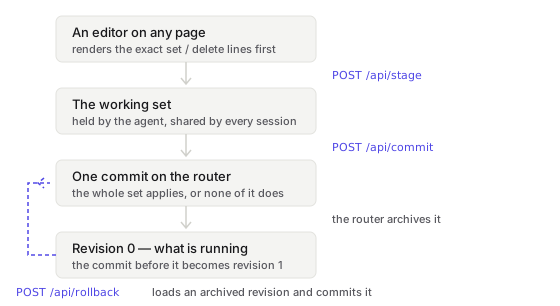
No page applies its own changes. An editor's Save, Add or Delete adds the change to the pending changes and stops. The Commit Bar, which appears at the bottom of the page while anything is pending, is the only part of the web interface that applies them.
Because a change waits in a list before it is applied, it can be reviewed, trimmed, abandoned, or applied with the router's own auto-revert timer armed.
The pages in this section#
| Page | The idea |
|---|---|
| The configuration tree | Nodes, tag nodes and values, and the subtree each screen owns. |
| Advanced mode and the router's commands | What the web interface says in words, and what Advanced mode adds in the router's language. |
| Pending changes | Where a change waits, who shares the list, and what may enter it. |
| The Commit Bar | Where pending changes are applied, and how it marks a change that could cut you off. |
| Apply with auto-revert | Apply with a timer armed: keep the changes, or the router restarts with its saved configuration. |
| Revisions and rollback | Every applied change is archived; restoring one loads an archived revision and applies it. |
| State, intent and drift | What the kernel is doing, beside what the configuration declares. |
| Desired state | One file describes the router; one engine turns the gap into operations. |
| Apps are configuration | An add-on is a container declared in the config tree. |
| Read plane, write plane, admin plane | Four roles, enforced by the agent on every route. |
| Accounts, sessions and tokens | The three kinds of principal, and what proves each one. |
| The audit log | Who changed what, from where. |
| What the licence gates | Reads never need a licence; every mutating route answers 402 without one. |
| What the agent asks the router | The cost of an API call, and the caching that follows from it. |
| On-router, off-router, fleet | Three ways the agent runs, and what changes in each. |
| Wheelhouse and VyOS | What comes from the base, and what Wheelhouse adds. |
Four properties of the configuration model#
The router underneath Wheelhouse is VyOS, and its configuration is a single transactional tree. Four properties follow from that:
- A set of changes exists as an object. It can be listed, reviewed and thrown away before anything happens.
- Applying is atomic. Either every pending change applies, or none does. The agent
sends all of them to the router's
/configureendpoint as one array. - The previous configuration is still there. The router archives each applied change, so going back means loading revision 1 rather than restoring a backup.
- The failure path is a restart into a known-good configuration. That is what Apply with auto-revert buys.
None of those four is Wheelhouse's. They are VyOS' — see Wheelhouse and VyOS. Wheelhouse adds the pending changes, the Commit Bar, the accounts and roles, the audit log, the app catalogue, the installer and the web UI.
Each page here states what a thing is, what it costs and where to see it. What to press on a given screen is in the manual: Network, Security, VPN and accounts and Services, monitoring and system.
See also#
- What Wheelhouse is — the same ground in one page, for someone deciding whether to install it.
- The manual — a page per screen: Network, Security, VPN and accounts, Services, monitoring and system.
- Agent endpoints — the API the UI consumes.
- About Wheelhouse — the licence boundary and the corresponding source.