Apply with auto-revert#
Apply with auto-revert applies the pending changes and starts a timer on the router at the same moment. If Keep changes is pressed before the timer runs out, the changes stay. If it is not, the router restarts, and starts with its saved configuration. That restart is the revert: it is how the router's own configuration system implements the feature.
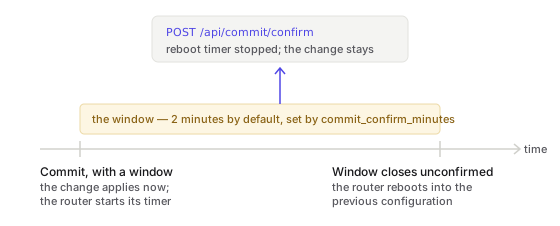
The window#
The window is set by an admin under Admin → Agent settings → Changes and auditing → Auto-revert window: from 1 to 60 minutes, 2 by default. The button on the Commit Bar states it, as Apply with auto-revert (2 min).
What the browser shows#
When the router has accepted the changes, the Commit Bar is replaced by a countdown that outranks everything else on the screen: a draining bar, Waiting for confirmation — 1:52 left, and one sentence:
If this page still responds, the changes work. Keep them, or the router restarts with its saved configuration when the time runs out.
A page that still responds proves the connection survived the change. Two buttons sit beside it:
- Keep changes stops the router's timer, and the changes stay. If that fails, for example because the changes were already kept from another session or the router cannot be reached, the reason is shown in the countdown rather than disappearing.
- Hide timer hides the countdown and does nothing else.
The countdown in the browser is the browser's arithmetic: the moment the router accepted the changes, plus the window. It shows the router's timer; it is not the timer itself. Keep the changes with time to spare.
What running out of time costs#
A restart, in full. Not a silent undo:
- Every session to the router drops, including yours and any SSH session.
- Apps stop and come back as the restored configuration declares them; see Apps are configuration.
- Uptime resets, and the restart takes as long as that hardware takes.
- The configuration that comes back is the saved one: what Save configuration on the System page last wrote. The changes applied with auto-revert are gone, and so is any change applied before them that was not saved.
A router in a rack recovers by itself. Keep the changes before walking away from a router.
When to use it#
The Commit Bar offers Apply with auto-revert for every set of pending changes, and marks the changes that most warrant it; the rule is on The Commit Bar. Use it whenever the change is in the path between you and the router:
- firewall rules and zone policy;
- NAT, including the rules that publish a service;
- an interface's addresses, especially on an uplink;
- the default route, failover, load balancing or policy routing;
- the SSH service, the router's HTTPS service and its API service;
- certificates and router accounts.
The reconcile loop uses the same mechanism when it has been started to apply changes: it
applies them with a window (the agent's --reconcile-confirm option, 2 minutes by
default) and keeps them only once the router still answers, so a change that cut the agent
off is reverted by the router on its own. See Desired state.
Auto-revert and restoring a revision are different tools#
| Apply with auto-revert | Restore a revision | |
|---|---|---|
| When you decide | Before applying | After applying |
| What triggers the undo | The window running out | You, deliberately |
| How the undo happens | The router restarts with its saved configuration | An archived revision is loaded and applied |
| Needs the router reachable | No | Yes |
| Costs a restart | Yes, when the window runs out | No |
Use auto-revert when a change might cost you the connection. Restore a revision when the change worked, was kept, and turned out to be wrong.
For automation#
The mechanism is the router's, not the agent's. An API client applies the pending changes with a window, then confirms:
R=https://<router>:8443
T=wh_...                                  # an API token with the operator role

curl -sk -X POST "$R/api/commit" -H "Authorization: Bearer $T" \
  -d '{"confirm_minutes":2}'
# {"success":true,"committed":3,"confirm_minutes":2,"awaiting_confirm":true}

curl -sk -X POST "$R/api/commit/confirm" -H "Authorization: Bearer $T"
# {"success":true}
Underneath, the agent sends the router one request with the operations and a
confirm_time, and one request with op: "confirm", both as JSON bodies: the form
encoding the router also accepts cannot carry confirm_time.
See also#
- The Commit Bar: where the button is, and what it marks.
- Revisions and rollback: the other undo.
- Pending changes: what gets applied.
- Recovering from a lockout: when the window ran out and you are still outside.
- Rolling back a change.